The "Cause" menu is used to create and manage all health related causes and removal reasons in the system. This includes diseases, conditions, and death or culling reasons that can later be selected when recording health events or removing animals from the herd.
To create causes, go to "Settings" - "Health" - "Cause". Click "+Add new row" to enter a new cause.
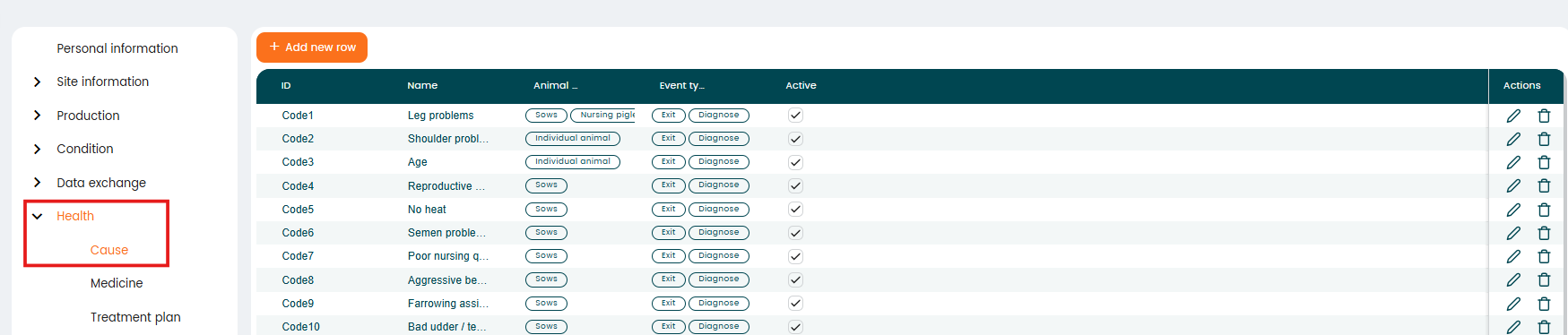
Each cause entry includes:
- "ID" – A short code used to identify the cause (e.g., SP, RP, AB)
- "Name" – Description of the disease or reason (e.g., Shoulder Problem, Abortion)
- "Animal Type" – The category of animals the cause applies to (e.g., Sows)
- "Event Type" – Defines whether the entry is used for:
- "Diagnose" (health condition/disease), or
- "Exit" (removal reason such as death or culling)
- "Active" – Indicates whether the cause is available for use in the system.
How to use causes
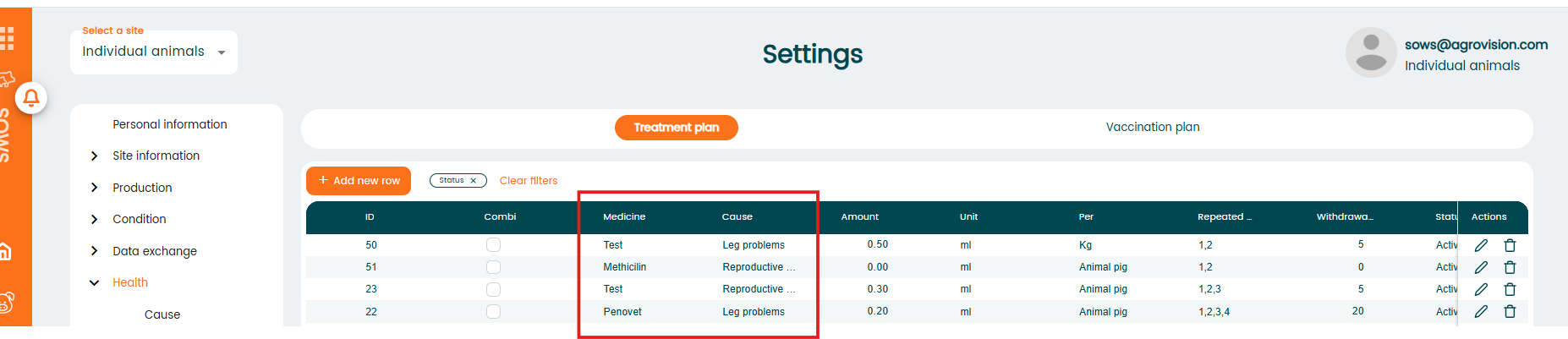
- Animal treatments. To set up your treatment, you will use the causes to create your treatment plans. Just go to "Settings" - "Health" - "Treatment plan" and connect the cause with the medication you need to use.
- Animal removals. When registering the removal of an animal, open "Animal Events" and select "Exit". Choose the appropriate event type from the dropdown list (Culled, Sold, Euthanized, or Dead), and then select the corresponding "Exit Cause". The list of exit causes is automatically generated based on the configuration in the "Cause" settings. Only causes that have been assigned to the relevant animal group and defined with “Exit” as the "Event Type" will appear in the selection list.
Was this article helpful?
That’s Great!
Thank you for your feedback
Sorry! We couldn't be helpful
Thank you for your feedback
Feedback sent
We appreciate your effort and will try to fix the article