Connecting reader to AgroVision Sows allows you to identify animals simply by scanning the tag with your reader, eliminating the need to manually enter the animal number. This makes the process faster and more accurate.
Before you can connect the reader with the app, you need to ensure that you have paired your reader to your mobile or tablet. The code is often 1234 when you pair the phone and the stick reader. List of approved readers.
Go to "Settings" in the top of AgroVision Sows
 Choose "Use RFID":
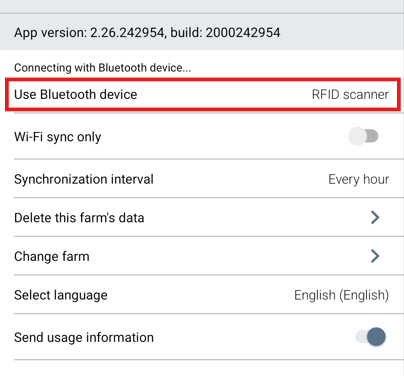
A new screen will then be shown, where you can connect the reader. From the options shown below, choose the one that best describes your device. For bluetooth readers, please choose RFID scanner.
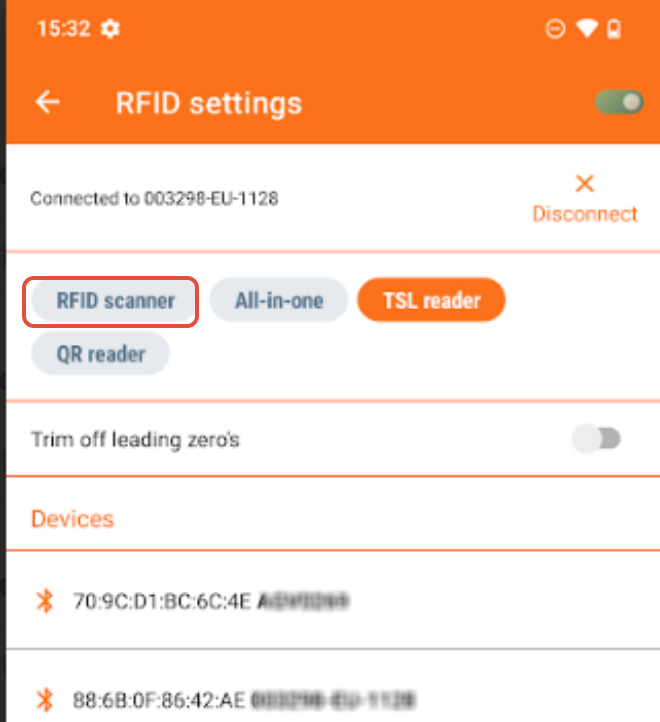
Your paired bluetooth reader should be shown in the list of "Devices". Tap on it to connect it to the app. Make sure it is switched on before you do this.
The device may beep to show connection is successful and it should also tell you on the screen that it is connected.
If one stick reader is used on several phones you can follow the same guide.
Was this article helpful?
That’s Great!
Thank you for your feedback
Sorry! We couldn't be helpful
Thank you for your feedback
Feedback sent
We appreciate your effort and will try to fix the article