In this article we show with an example, how to delete data in the program. The way to do it will be the same for the rest of the registrations you need to delete in the program.
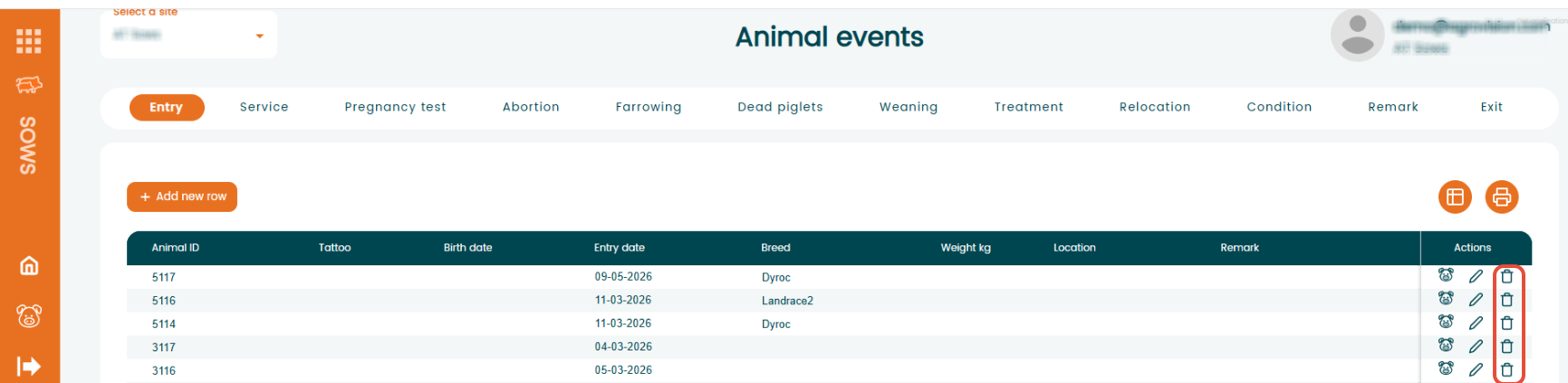
Go to "Animal Events", select the event where the registration is stored. In this example, we will delete an "Entry" registration.
- Click "Entry" to display all entry registrations.
- Find the row containing the registration you want to delete.
- In the "Actions column, click the "bin" (trash) icon next to the row you want to delete.
- The selected registration will be removed from the system.
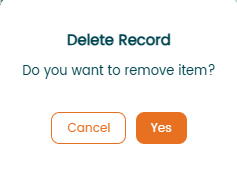
When you click, a pop up message will appear asking if you want to delete that record. Click "Yes" and the record will be deleted. Please note you won't be able to recover it once deleted. Click "Cancel" and the delete process will stop and the data will stay in the app.
Was this article helpful?
That’s Great!
Thank you for your feedback
Sorry! We couldn't be helpful
Thank you for your feedback
Feedback sent
We appreciate your effort and will try to fix the article