NB. Topigs Norsvin only.
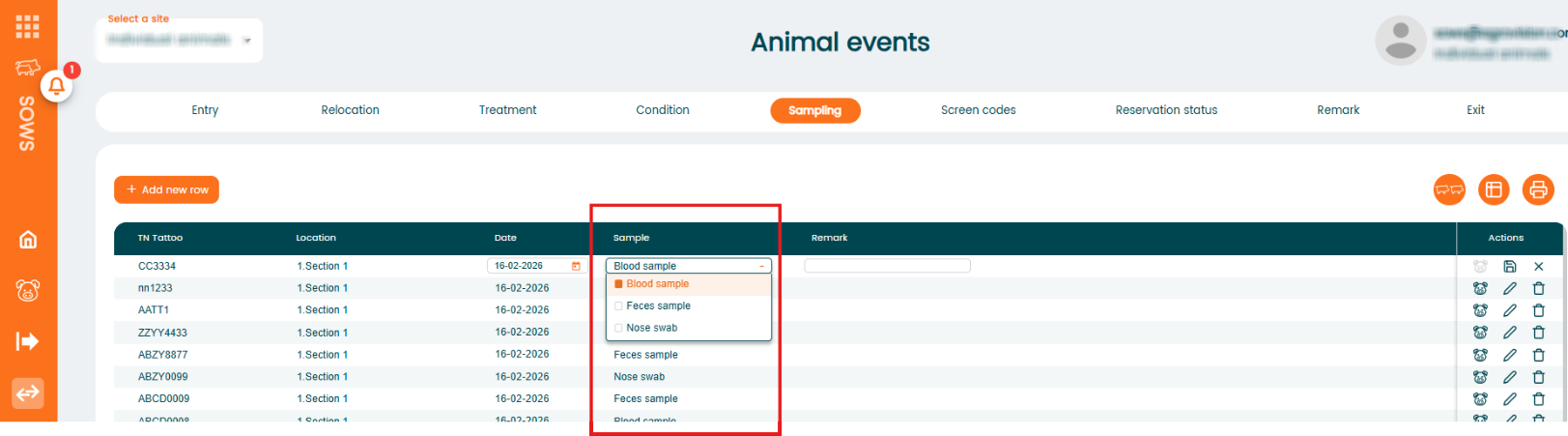
The Sampling function allows you to record samples taken from animals. The program includes three predefined sampling types that can be selected:
- Blood sample
- Feces sample
- Nose swab
These sampling types are built into the system and cannot be changed or extended.
Add a Sampling for a single animal
- Go to "Animal events" - "Sampling".
- Click "+ Add new row".
- Enter the required information such as animal number, date, and any remark if needed. ""Select the appropriate sampling type from the dropdown list.
- Save the record.

Was this article helpful?
That’s Great!
Thank you for your feedback
Sorry! We couldn't be helpful
Thank you for your feedback
Feedback sent
We appreciate your effort and will try to fix the article