NB: This only applies for AgroVision Sows - "Individual Animals management".
Combination treatment plans (Combi treatments) enable you to merge several individual treatment plans into a single structured plan that can be registered with one action. This feature is particularly beneficial when animals require multiple treatments at the same time. The program allows you to combine several treatments into one unified plan, called a Combi-plan, simplifying registration, improving consistency, and ensuring accurate documentation of all applied treatments.
Go to "Settings" - "Health" - "Treatment plan".
Create a new treatment plan by clicking on "+ Add new row". Give the treatment plan an ID and check mark the "Combi" column to combine the treatment plans.

A new window appears.
Here you check mark which treatment plans you want to combine.
Press "Save" when done.

The combi-plan is now set up and ready to use for treatments.
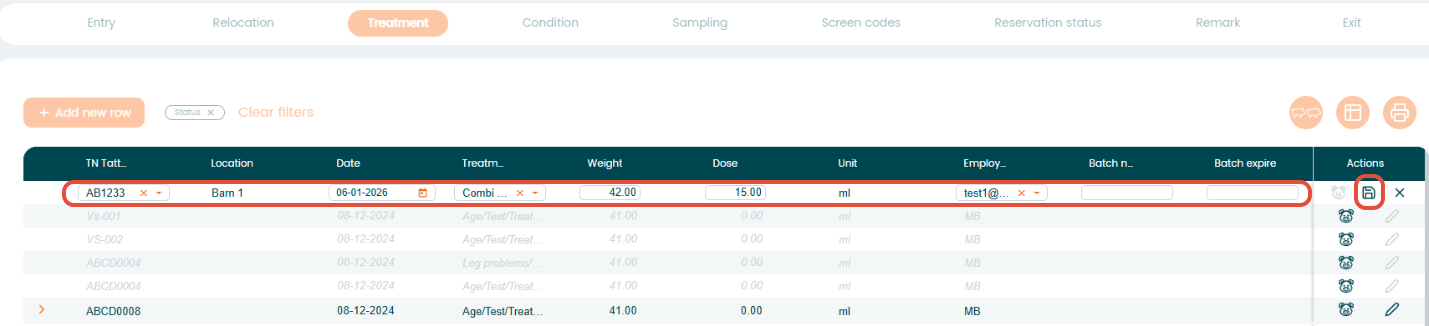
Go to "Animal events" - "Treatment" and press "+ Add new row" to start an animal treatment. Simply fill in the animal information needed in the different columns.
You can also treat a group of animals by clicking the multiple animals icon.

Afterwards, press the "+ Add new row" icon to create a new registration and choose your animals based on a location.
By default, all animals in the location will be check marked. If not all animals should be treated, simply remove the check mark from the "Selected" column for any animals you do not want to treat.
If required, you can also change the weight of the animals.
Press enter or "Save" to save the treatment.
Was this article helpful?
That’s Great!
Thank you for your feedback
Sorry! We couldn't be helpful
Thank you for your feedback
Feedback sent
We appreciate your effort and will try to fix the article